• About
  • Visit Gray Star Design
  • Minted Collection
  • Design Services
  • Contact

The Design Inspirationalist

~ Inspiring Ideas | Spectacular Creations

The Design Inspirationalist

Tag Archives: taxes

The Freelancer’s Guide to the Galaxy: The Perks + Challenges of Self-Employment

10 Thursday Sep 2015

Posted by melissaoconnor in Design in Business

≈ 2 Comments

Tags

balance, create schedules, designer, fees, finances, finding work, freelance, freelancer's guide, freshbooks, invoicing, marketing, online invoicing, rates, self employment, taxes, work schedule

The Freelancer's Guide to the Galaxy

Being a freelancer can be really awesome in so many ways. You get to be your own boss and create your own schedule, allocate time how you see fit, work in your own environment, and set your own rates.

However, there are also a few challenges:

Constantly being on your game to find projects
You don’t have a job to go to everyday with assignments all set for you to do, so you have to work at finding new projects pretty much all the time. It takes dedication and perseverance, but once you get the hang of it, most of your clients should be steady at some point and even refer you to new ones.

You should also remember to be open to different outlets that may bring you income as well. If you are a designer, where can you sell your work? Thanks to the internet, there are many ways to do this. And the same with social networking, you don’t need to be everywhere, but you should be on the websites that are the best for you to market yourself.

Handling your admin work
Now unless you hire someone else to do it, you have to take care of the not so fun work like keeping tabs on accounts, updating your newsletter, and writing verbiage for your website and other documents. After awhile, its something you will just get used to doing.

Personally deal with clients when you may not want to
Let’s be honest, there will be days when you really don’t want to meet or talk with clients, but you will have to. You are the boss. I think emails make this so much easier, don’t you think? It always helps to be clear about your project and get all details necessary before you get started to avoid any repetitive communication that may get annoying.

Not have a steady paycheck
This certainly sucks and at times it can get scary. But you took the leap and decided you wanted to be self employed so this sadly comes along with that. Just make sure your rates are fair without selling yourself short and keep that work flowing.

Learn how to balance your personal and professional
life if you work from home
This can be very hard, especially when you first start out. It’s definitely an adjustment and can be very challenging if you have children. Working from home is awesome but it has its drawbacks. Just stay focused and keep yourself organized enough so your schedule doesn’t overrun you. It’s a good idea to set certain times when you plan to work and even have a dedicated space, away from the rest of the living space, to do it. Distractions are the worst!

Try to learn about taxes so you aren’t in the dark about your money
I have done my own taxes for years and continue to do it for my husband and I. I am the type of person who tries to understand every aspect of my business and taxes are a part of that. Now, if you are totally not interested, then hiring a professional to help you is the best thing to do. I recommend Amy Northard, who works specifically with creatives and knows the ins and outs of tax time and beyond. You can also check out my post, Get Your Finances Straight: A Short Guide for Freelancers and Small Business Owners, to learn my easy methods of keeping your purchases organized and income easy to track throughout the year.

Handle invoices and discussing fees
Not everyone likes to talk about money. I, for one, never felt that comfortable discussing rates to my clients. BUT, this is something you have to do. It’s your livelihood and no one else is going to do it for you. Always research what the going rates are for the type of services you offer so you are not selling yourself short. And consider your VALUE a huge factor when figuring out what to charge.

When it comes to invoicing there are a bunch of services out there to make that department much easier. If you are old school and simply send a PDF invoice to your clients, that works. I prefer Paypal invoicing because its my main account for my business and using all their tools just makes my life easier. There is also an online service like FreshBooks that can surely help with super smooth invoicing and tools that make sense. Definitely something you should consider checking out.

Always having to market yourself to the world
Marketing should be on top of your list and a major focus in your business. Whether its social media, mailers, advertising, or blog posts, getting your name and work out there is a must for any business to grow. Since I am a designer, I handle all of this, which I don’t mind doing. For me, its a creative outlet to introduce myself to more potential clients and present my work to all different kinds of communities. But if you have to hire someone to take care of the marketing end of your business, then do it. Bad marketing is bad for business. Period.

I am currently working on a new course, Branding + Marketing 101: A Guide to Boost Your Business, Inspire Ideas, and Help Create a Brand that Represents You and Your Work, that I am very excited about. I plan to launch it late September/early October so keep your eyes peeled!

Let’s just say there are way more things you are responsible for than if you worked a 9 to 5 job. It could take years to get your business booming and hold a steady amount of clients, but if you are passionate about what you do and know in your heart that freelancing is the best option, then everything will fall into place.

My friends over at Freshbooks sent me a fun info graphic to share. It goes through all the things you probably will encounter on your journey of self-employment. Enjoy!
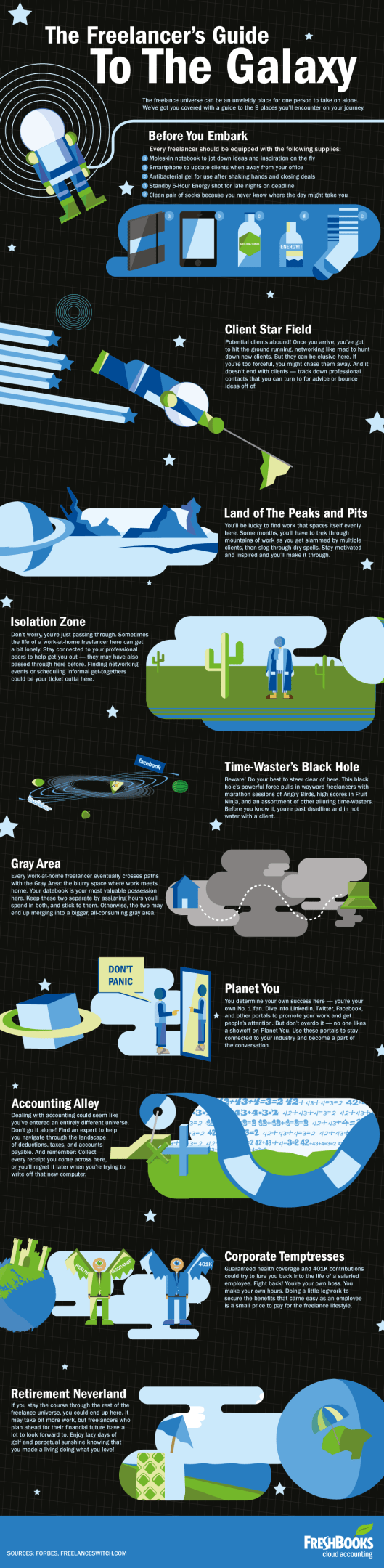
The Freelancer's Guide to the Galaxy


Get Your Finances Straight: A Short Guide for Freelancers and Small Business Owners

22 Wednesday Jul 2015

Posted by melissaoconnor in Art & Design, Design in Business

≈ 1 Comment

Tags

financial advice, financial tips, freelance finance tips, get organized, taxes

Get Your Finances Straight

Being in business for yourself is a great thing. Whether you are a designer, writer, crafter, or shop owner, there are some main things you need to know about the financial end of the business. Unfortunately, these things are not so fun, but it’s essential you understand them so it makes your life easier.

Since there are a million and one things one must consider when doing their taxes, most people have a professional take care of this for them. Which makes perfect sense. And others just figure it out themselves and get it done. If you are one of those types, I highly recommend Amy’s Northard’s new course, Be Your Own CFO. It includes everything you need to know about bookkeeping and taxes.

Now, whether you have someone do your taxes or not, you still need to be organized and keep track of your spending, income, sales tax, and profit. I have created an easy way to do this and I am sharing it with you today. I hope it helps you feel more at ease with the financial side of your business, knowing everything is in order and all set to go.

Now just a little bit on me…

I have been freelancing since 2006. And although in the beginning it was a few projects here and there, those experiences helped me prepare for my future of being a small business owner.

Once I graduated, I worked as a freelancer part time for a local Jersey photographer and soon after scored a full time graphic position at a company in Long Island where I would mostly be doing digital illustration. So I packed my things, said my goodbyes, and in 2 weeks I was back to being a New Yorker. Unfortunately, that position only lasted 6 months and I was laid off – without having any idea it was coming. That basically turned my world upside down. Needless to say, the next year or so was rough.

I toughed it out and did what I had to do so I could pay my rent and eat, but it was no fun. I found most work off the books because it was my only option and did freelance work when I could. Once I started designing for Petite Picasso, everything started to look up. Fast forward to now… I am the owner of Gray Star Design, a thriving small design studio, and a Minted designer. It took me lots of time and work to get where I am now and I feel very lucky to do what I love, on my own terms.

During those rough years I told myself I would never work for anyone else again. Well, I accomplished what I wanted and couldn’t be happier.

But one thing I found that truly helped me was my organizational skills. I know not everyone has the ability to compartmentalize things and create systems that work, but its something I have always been good at. So applying this skill to my finances made it so much easier when tax time came around.

Here are some easy tips that can seriously help you get your financial files sorted out and streamlined, so there will be no worries in that department. They have truly helped me in the past and continue to be my one and only system to this day. And because most is done online these days, that makes this process so much easier.

Getting Started
First off, create a folder for the year. Then create sub folders: Income + Receipts. In each folder, create one for each month. Now if you have to charge sales tax to your items, create another folder within the main year folder titled ‘Sales Tax’. In this folder, keep a reference guide of the sales tax schedule and any info pertaining to this subject so its all in one place. Now that I file mine yearly, I have folders titled those dates with the appropriate PDFs in them.

Spending
Tracking your spending is so important. For me, its a major part of my business since I do a lot of printing for both stationery items and albums. All you really need to do is keep your receipts organized. So for whatever you spend your income on, create a folder for it. And if you are a little confused on what to include in some of them, take note of what I do. Below are the folders I use and what I keep in them.

Etsy – monthly bill receipts
Services – any service you pay for such as a tax specialist
Fonts & Graphics – any fonts, stock photos, graphic files, templates, etc..
Office Supplies – tape, shipping supplies, ink, packaging for items
Subscriptions – magazines, groups, websites, etc..
Printing – stationery items, albums, marketing materials for clients
Supplies for Orders – envelopes, paper, etc..

Title each receipt/pdf with where you purchased it from and the date so it will automatically be arranged in an order that reads easily. Keeping digital files makes all the difference here.

Sales tax
For this category, just create a textedit file listing all the orders you had to charge sales tax for, per month. Include the total of the order, tax paid, and net profit.

Income
Since I mostly use Etsy and Paypal for my income, its quite easy to use their tools to calculate monthly finances. In your income folder, create a textedit file that lists all your spending (from the folders above), your gross income (total before spending), and then your net income (total after you subtract spending).

Now since I do a lot of shipping, I add that category to the list but it doesn’t need a folder in my spending because Paypal calculates that amount for me. Yay! Just one less thing to do. Another category I add to the income text file are my Paypal fees, which is already calculated for me too.

Now, at the end of the year, you will have already figured out your numbers and doing your taxes should be super easy and less time consuming. For some great information on all things freelance, hop on over to the Freelancers Union, and join while you are there. They have a ton of helpful blogs, benefits, recourses, and tips for all of us. For more guidance on money and taxes, click here.

FREE STAT TRACKER!
And if you want to organize your social media stats, which is a great idea, you can download my nifty stats sheet by signing up for my newsletter. The tracker is an easy way to watch your numbers grow during the year and includes Facebook, Twitter, Tumblr, Instagram, Pinterest, blog stats, and also your income. Just click below to sign up and get your free download now!

Newsletter Stat Tracker

color in films sound in color art inpsired palettes
art and design the home events and parties weddings real weddings color inspiration film-reviews historic places news and updatesminted


minted.com

Enter your email address to follow this blog and receive notifications of new posts by email.

Archives


martha

Magnolia Rouge

Screen Shot 2014-04-23 at 2.29.10 PM

Etsy

Screen Shot 2014-04-23 at 2.18.10 PM

logo

Screen Shot 2014-04-23 at 2.42.13 PM

P&PBlogHeader

wedding chicks


ruffled

Screen Shot 2014-04-23 at 2.47.49 PM

Screen Shot 2014-04-23 at 2.16.32 PM


lauren-elle-photography

jenlombardo

logo_website

site-logo1

kelly_dekenipp_logo

homelogo

Website Powered by WordPress.com.

Privacy & Cookies: This site uses cookies. By continuing to use this website, you agree to their use.
To find out more, including how to control cookies, see here: Cookie Policy
  • Subscribe Subscribed
    • The Design Inspirationalist
    • Join 1,380 other subscribers
    • Already have a WordPress.com account? Log in now.
    • The Design Inspirationalist
    • Subscribe Subscribed
    • Sign up
    • Log in
    • Report this content
    • View site in Reader
    • Manage subscriptions
    • Collapse this bar
 

Loading Comments...